> ## Documentation Index
> Fetch the complete documentation index at: https://docs.voicemetrics.ai/llms.txt
> Use this file to discover all available pages before exploring further.
# Webhook (Contacts)
> Webhooks allow external tools and platforms (like CRM systems, landing pages, or marketing forms) to push data into your white-label Voice AI platform. With lead webhooks, you can automatically add or update leads, assign them to lists or tags, and trigger outbound call automations in real-time.
## **Webhooks Overview**
Webhooks provide a seamless way to:
* \*\*Capture new contacts \*\*from any external platform
* **Update contact information** (e.g., name, phone, email, tags)
* \*\*Organize contacts \*\*into lists or apply tags for segmentation
* **Trigger Outbound Automations** based on new contact creation
Webhooks save time and improve contact response speed by automating the contact ingestion process, eliminating the need for manual entry.
## **What is a Contact Webhook?**
A **Contact Webhook** is a unique URL where you can send HTTP POST requests to add or update contact data.
## **How It Works**
* You connect your third-party platform (e.g., CRM, form builder, ad tool) to the webhook URL.
* When a new contact is generated or updated, data is sent to the webhook.
* The system **automatically adds or updates** the contact record in the client account.
* Tags or lists (if configured) are applied, and **outbound automations** can be triggered instantly.
 ## **How to Create a Webhook**
Follow these steps to create a contact webhook inside your platform:
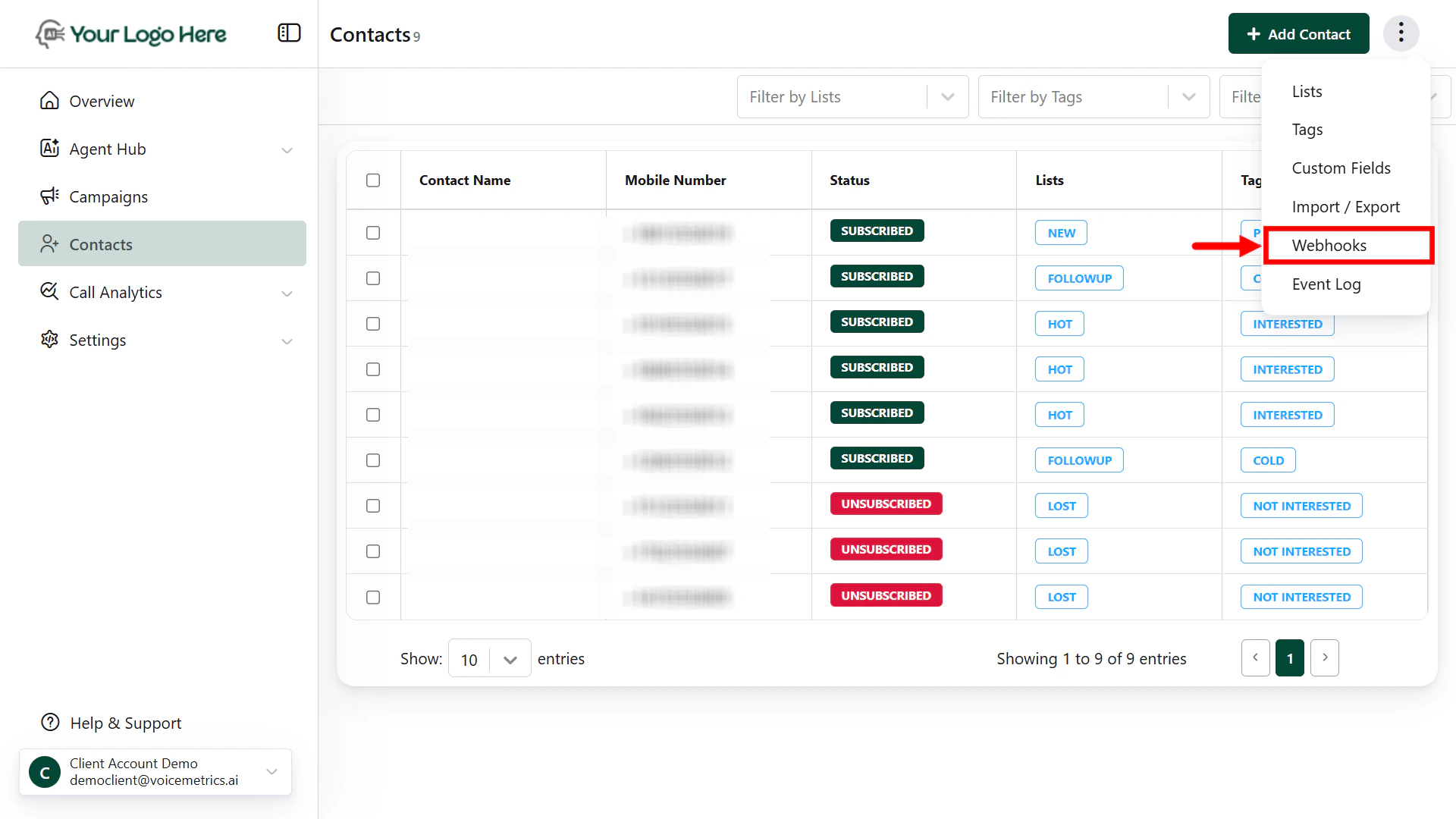
1. Navigate to the **Contacts** Menu
2. Click on three dots (⋮) > tap “**Webhooks**”
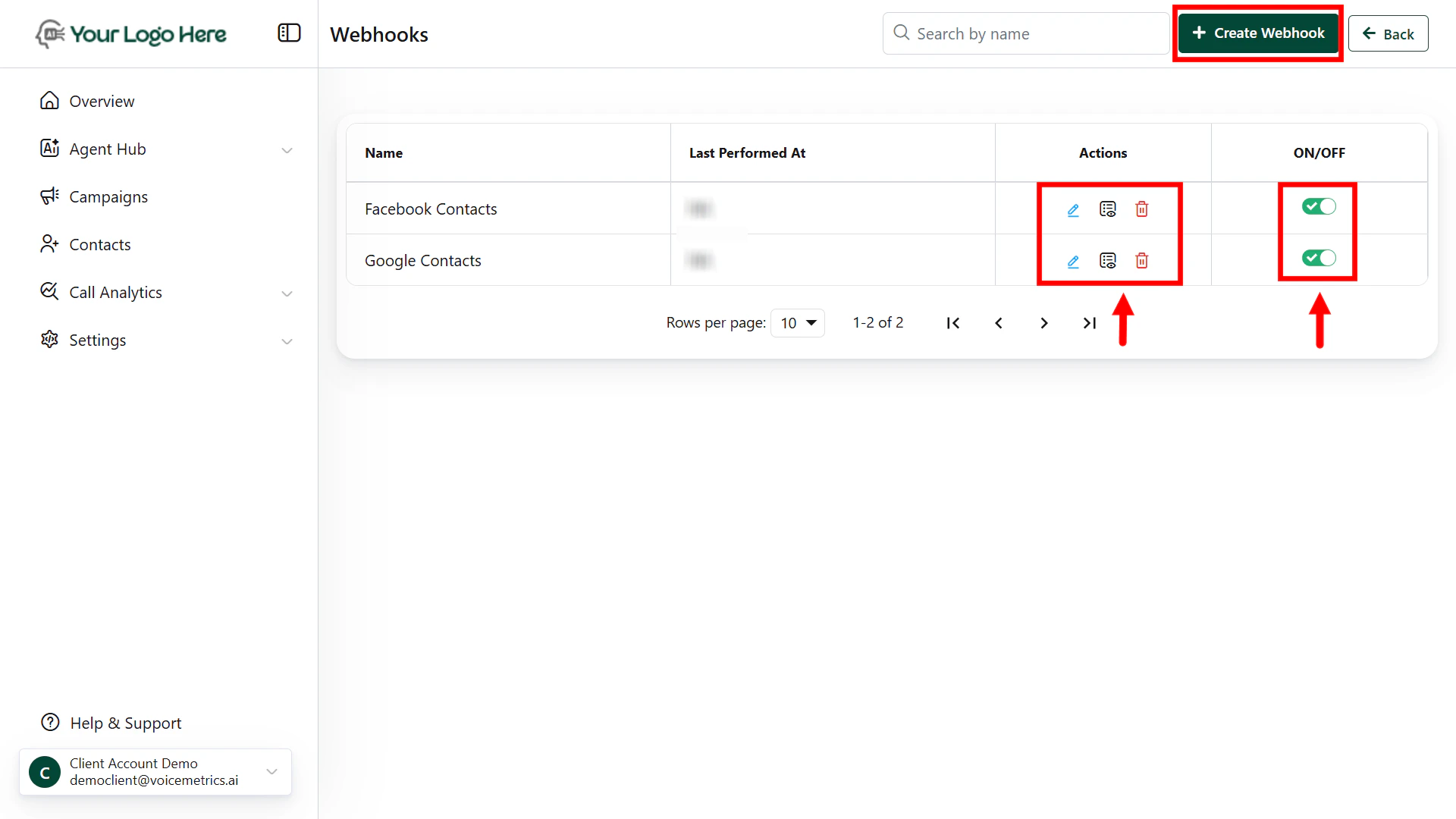
3. Click the **Create Webhook** button to begin.
4. Fill in the **Webhook** Details
* **Webhook Name** – Give a recognizable name (e.g., “Facebook Leads”)
* **Webhook URL** – A unique system-generated endpoint where you’ll send data
Example: [https://demo.aivoiceagent.app/server/Customize/Webhooks/webhook.php?id=684828](https://demo.aivoiceagent.app/server/Customize/Webhooks/webhook.php?id=684828)
4. Field Mapping
5. Map the data fields you will send to the appropriate lead fields:
* First Name
* Last Name
* Phone Number
* Email
* Any custom fields (e.g., budget, service interest)
6. Tag/List Management (Optional)
7. Apply your desired Tags
* Apply default **Tags** (e.g., “facebook\_ads”, “hot\_leads”).
* Assign leads to specific **Lists** for targeted follow-up or automation.
## **How to Create a Webhook**
Follow these steps to create a contact webhook inside your platform:
1. Navigate to the **Contacts** Menu
2. Click on three dots (⋮) > tap “**Webhooks**”
3. Click the **Create Webhook** button to begin.
4. Fill in the **Webhook** Details
* **Webhook Name** – Give a recognizable name (e.g., “Facebook Leads”)
* **Webhook URL** – A unique system-generated endpoint where you’ll send data
Example: [https://demo.aivoiceagent.app/server/Customize/Webhooks/webhook.php?id=684828](https://demo.aivoiceagent.app/server/Customize/Webhooks/webhook.php?id=684828)
4. Field Mapping
5. Map the data fields you will send to the appropriate lead fields:
* First Name
* Last Name
* Phone Number
* Email
* Any custom fields (e.g., budget, service interest)
6. Tag/List Management (Optional)
7. Apply your desired Tags
* Apply default **Tags** (e.g., “facebook\_ads”, “hot\_leads”).
* Assign leads to specific **Lists** for targeted follow-up or automation.
 ## **Sending Data via Webhook**
Make a **POST** request from your external tool (e.g., Zapier, Make, N8N, CRM) to the provided webhook URL with your contact data.
```
Example Payload:
{
"first_name": "John",
"last_name": "Doe",
"phone": "+1234567890",
"email": "john.doe@example.com",
"tags": ["hot_lead", "demo_requested"],
"list_id": "real_estate_campaign"
}
```
If the lead already exists (matched by phone number), it will be **updated** instead of **duplicated**.
## **Automation Trigger**
You can set up **Outbound Call Automations** to trigger when:
* A **new contact is added**
* A **contact is updated with specific tags or lists**
This ensures the contact gets dialled instantly without delays.
## **Use Cases**
* Facebook/Instagram Ads – Capture contacts from ad forms and start voice conversations instantly
* Landing Page Forms – Send contacts from your website to AI agents via webhook
* CRM → Platform Sync – Keep your CRM contacts updated and initiate outreach calls
* Auto-assign tags/lists for dynamic campaigns
## **Sending Data via Webhook**
Make a **POST** request from your external tool (e.g., Zapier, Make, N8N, CRM) to the provided webhook URL with your contact data.
```
Example Payload:
{
"first_name": "John",
"last_name": "Doe",
"phone": "+1234567890",
"email": "john.doe@example.com",
"tags": ["hot_lead", "demo_requested"],
"list_id": "real_estate_campaign"
}
```
If the lead already exists (matched by phone number), it will be **updated** instead of **duplicated**.
## **Automation Trigger**
You can set up **Outbound Call Automations** to trigger when:
* A **new contact is added**
* A **contact is updated with specific tags or lists**
This ensures the contact gets dialled instantly without delays.
## **Use Cases**
* Facebook/Instagram Ads – Capture contacts from ad forms and start voice conversations instantly
* Landing Page Forms – Send contacts from your website to AI agents via webhook
* CRM → Platform Sync – Keep your CRM contacts updated and initiate outreach calls
* Auto-assign tags/lists for dynamic campaigns